SELECT T.name ,S.name
FROM sys.tables T JOIN sys.schemas S ON T.schema_id = S.schema_id
ORDER BY T.name ASC
Showing posts with label Tsql. Show all posts
Showing posts with label Tsql. Show all posts
Thursday, July 11, 2013
List all tables with their schema name in a database

Monday, March 11, 2013
List All plans in the cache SQL Server 2008
SELECT
[cp].[refcounts] ,
[cp].[usecounts] ,
[cp].[objtype] ,
[st].[dbid] ,
[st].[objectid] ,
[st].[text] ,
[qp].[query_plan]
FROM sys.dm_exec_cached_plans cp
CROSS APPLY sys.dm_exec_sql_text ( cp.plan_handle ) st
CROSS APPLY sys.dm_exec_query_plan ( cp.plan_handle ) qp ;
Tuesday, November 27, 2012
Set time to zero in a datetime value
If you have a datetime value that displays in the following format : 2012-11-27 14:53:15.4430000
and you would like it to be displayed this way (time set to "0"): 2012-11-27 00:00:00.0000000
Tip :
and you would like it to be displayed this way (time set to "0"): 2012-11-27 00:00:00.0000000
Tip :
declare @myDate datetime2;)
select @mydate = DATEADD(DD, 0, DATEDIFF(DD, 0, GETDATE()))
Monday, November 26, 2012
compare 2 tables with different names or schema
Problem:
You have 2 tables that you would like to compare at the column level (retrieve a list of the columns with different data types and/or names).
It happened to me today and the tables had 100+ columns so...
Alternative 1:
if the tables have the same names and a primary key , you can use one hidden gem of SQL Server (since version 90) called tablediff.exe .
Alternative 2:
My problem is the following , both tables belong to the same schema but hold different names. One of the tables is a simple import table (used to import text files) and has no primary key. Archiving the data from the import table to the destination table fails due a potential data truncation.
For the sake of the example I will a use a database called TestDb that have 2 tables : books and books 1.

As you can see here the only difference is the BookTitle field that has a different length.
Run the following query :
 The except statement will select (without duplicates) the elements contained in the left table that are not present in the right table (here books1)
here is the result:

Rgds.
You have 2 tables that you would like to compare at the column level (retrieve a list of the columns with different data types and/or names).
It happened to me today and the tables had 100+ columns so...
Alternative 1:
if the tables have the same names and a primary key , you can use one hidden gem of SQL Server (since version 90) called tablediff.exe .
Alternative 2:
My problem is the following , both tables belong to the same schema but hold different names. One of the tables is a simple import table (used to import text files) and has no primary key. Archiving the data from the import table to the destination table fails due a potential data truncation.
For the sake of the example I will a use a database called TestDb that have 2 tables : books and books 1.

As you can see here the only difference is the BookTitle field that has a different length.
Run the following query :
here is the result:

Rgds.
Thursday, October 18, 2012
SQL Template to delete SQL job, maintenance plan and schedule
Problem:
on our test servers , or servers that used to be managed by third party companies, the sql job list can become ...messy.
I came with a SQL server template to delete the job, the maintenance plan and the schedule if unused.
1. Create the template:
open the "view Template" window:

the template menu appears by default at the right of the SSMS window.
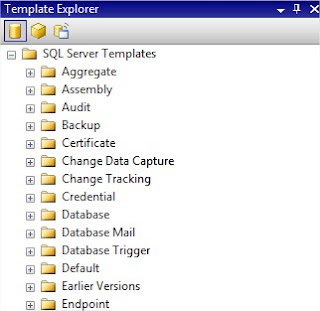
Create a folder of you choice in the Template explorer list , right click and choose "new template"
 Name the template as you wish , right click the template and choose "Edit".
 2. Now copy the code that you can download from here
within the code you will notice special strings , these are the template parameters :

3.Save the template
4. Using the template:
Create a new query on the server on which you want to run the template.
Then simply drag the template you just saved on the blank query window
The template code is then copied on the new query window.
Then here is the cool stuff: click on CTRL+SHIFT+M and you will be prompted to enter the parameters:

The first parameter is to specify the job name, the second parameter (Delete_Maintenance_plan) should be set to 1 if you want to delete the associated maintenance plan. Of course this is only a simple script, error check should be added to check if there is actually a maintenance plan etc..
Nonetheless it is still useful, and shows the basics of using templates.
on our test servers , or servers that used to be managed by third party companies, the sql job list can become ...messy.
I came with a SQL server template to delete the job, the maintenance plan and the schedule if unused.
1. Create the template:
open the "view Template" window:

the template menu appears by default at the right of the SSMS window.

Create a folder of you choice in the Template explorer list , right click and choose "new template"
within the code you will notice special strings , these are the template parameters :

3.Save the template
4. Using the template:
Create a new query on the server on which you want to run the template.
Then simply drag the template you just saved on the blank query window
The template code is then copied on the new query window.
Then here is the cool stuff: click on CTRL+SHIFT+M and you will be prompted to enter the parameters:

The first parameter is to specify the job name, the second parameter (Delete_Maintenance_plan) should be set to 1 if you want to delete the associated maintenance plan. Of course this is only a simple script, error check should be added to check if there is actually a maintenance plan etc..
Nonetheless it is still useful, and shows the basics of using templates.
Tuesday, October 16, 2012
Free sql online formatter tool
Recently found out this TSQL Formatting tool that is worth sharing : Instant SQL Formatter
Really like it as there are many options, can really save some time and improve readability.

enjoy
Really like it as there are many options, can really save some time and improve readability.

enjoy
How to select column names of a table
select COLUMN_NAME from INFORMATION_SCHEMA.COLUMNS where TABLE_NAME ='my_table'
Subscribe to:
Posts (Atom)